
How to buy and sell fishing gear on Copes Tirgus
Copes Tirgus is a fishing, hunting and outdoor gear market in Latvia. Buy and sell, message online and get told when what you are looking for appears. No commission.
Also an app for iPhone and Android


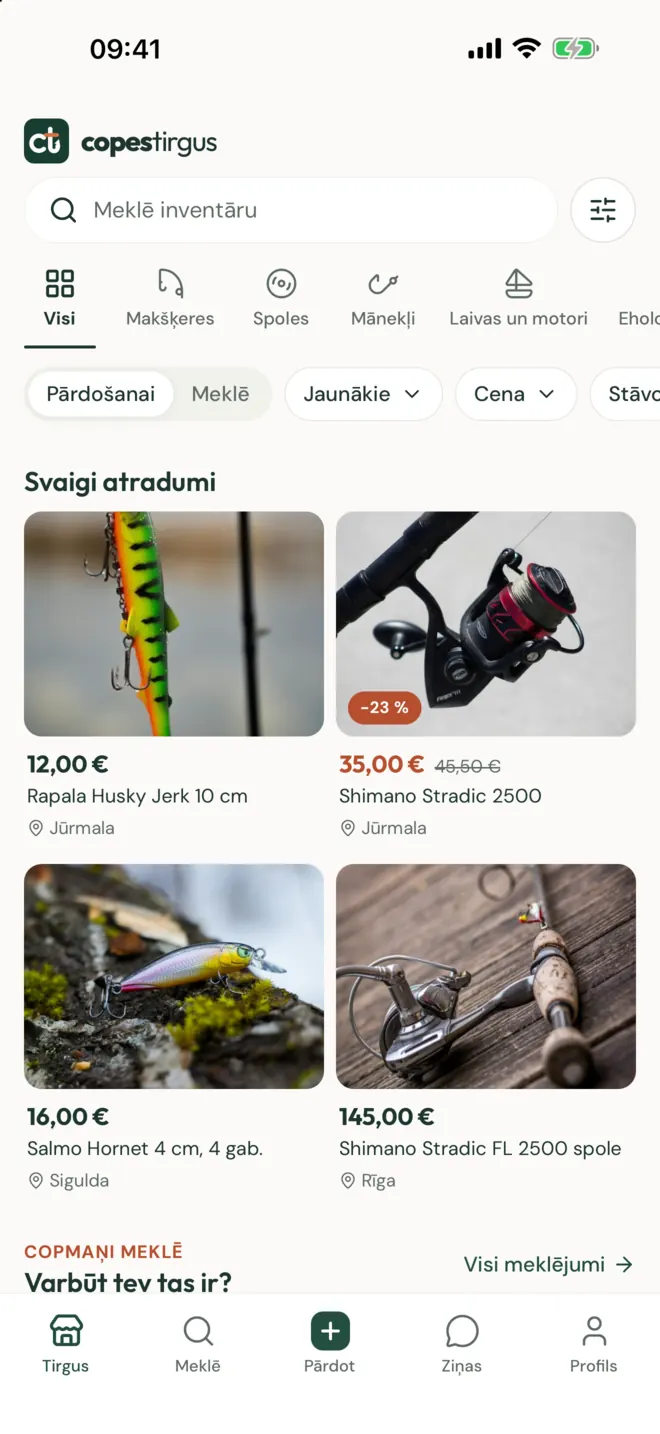
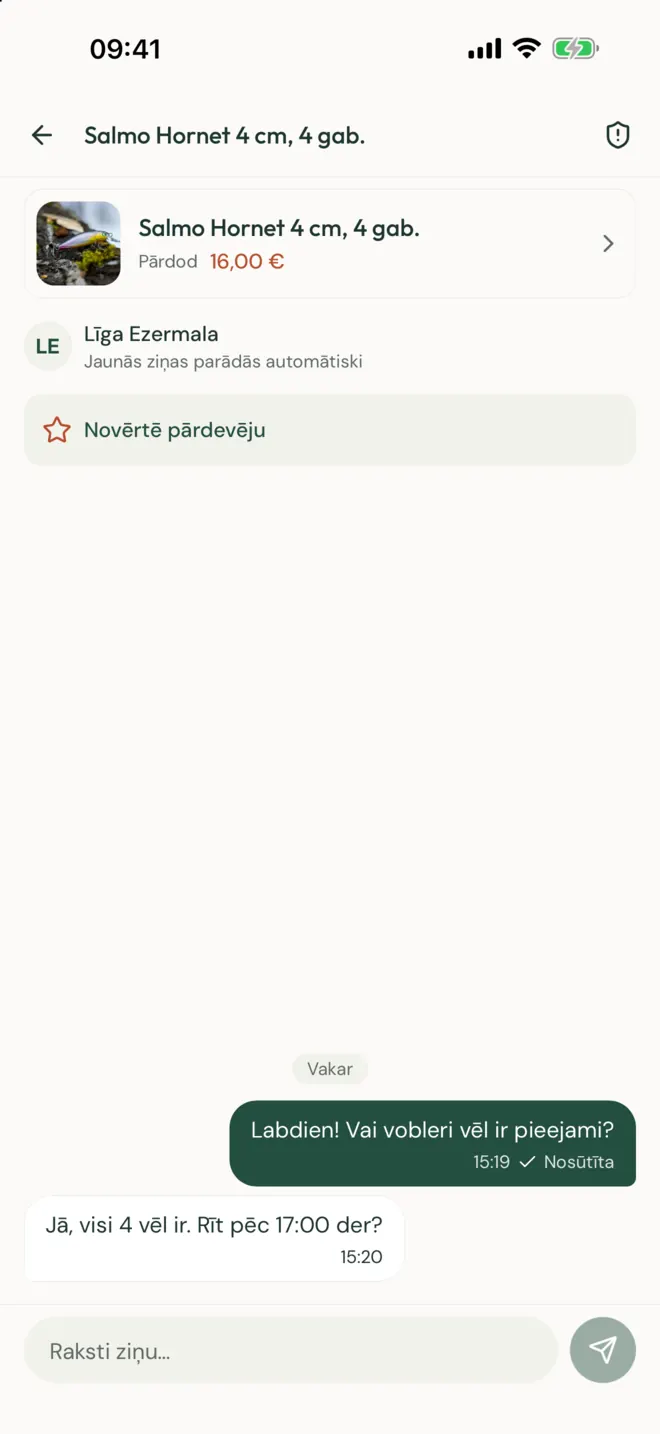
In short
Sell
- Sign in with email, Google or Facebook.
- Add photos, a title and a price.
- Reply to buyers in messages and agree on the hand-over.
Buy
- Find what you need with search and filters.
- Message or call the seller.
- Inspect the gear and agree on payment.
Free and safe
-
No commission
Ads and messages are free, and we take no commission from deals.
-
Report and block
Report a suspicious ad or conversation and block a member so they can no longer message you.
-
Basics of a safe deal
Copes Tirgus does not handle payments. Check the gear and the other person before you pay, do not open unfamiliar payment links and never share bank passwords or authentication codes.
How to find and buy
The market has used and new gear from all over Latvia. You can browse without an account, but you need to sign in to message a seller.
Search the market
Type what you need or pick a category. Narrow it down by price, place, brand and condition.
Message the seller
On the ad, press “Contact”. If you prefer, call the listed phone number.
Inspect and agree
Agree on price, payment and hand-over yourselves. Inspect the gear before you pay.
Ads marked “Reserved” look paler in the market: the seller has agreed with someone, but the deal is not done yet.
When a seller lowers the price, the ad shows a “Price reduced” mark and the earlier price.
See ads with a lower price Open the market- €45 Spinning rod 2.40 m Riga
- €60 Reel 3000 Jelgava
- Reserved €25 Lure box Cēsis
How to sell
You can post an ad in a few minutes, and it appears in the market straight away.
Sign in
With email, Google or Facebook. Add a phone number to your profile if you want calls.
Post the ad
Add photos, a title and a price and press “Publish ad”.
Reply to buyers
Find messages under “Messages”. Once you agree, you can mark the ad as reserved.
Mark it sold
In “My ads”, press “Mark as sold” and the ad leaves the market.
- Your draft saves automatically, so you can finish it later.
- You can have up to 20 live ads at a time.
- Ads are free. After a sale you can support Copes Tirgus voluntarily, but you don't have to.
- Title
- Reel 3000, used one season
- Price
- €60
Wanted: if you can't find it
Create a wanted ad. It appears under “Wanted”, and people who have the item can message you.
Describe what you need
A budget and photo are optional but help sellers understand what you want.
Wait for a message
When someone offers, the conversation appears under “Messages”.
Messages on the site
Message the seller or buyer right here on the site. Messages arrive instantly and you can see when yours has been read. No need to share your phone number.
-
Photos in messages
Send up to 10 photos in one conversation, for example a close-up or a tape measure next to the gear. Add them with the button, by dragging or by pasting.
-
Send the seller your parcel locker
Save up to two Omniva or DPD parcel lockers in your profile. In a conversation, press the parcel button and the seller gets the locker address and your phone number for the shipment.
-
Reminder to the seller
If a seller does not answer a buyer for a while, we send them a reminder by email or on their phone.
-
Phone as a backup
If the seller added a phone number, you can call or message them on WhatsApp from the ad.
Spinning rod, 2.40 m
- Can you show the handle closer?
- Here you go.
- I'll take it. Can you send it to a parcel locker?
- Omniva parcel lockerRiga, Brīvības iela 1. Phone for the shipment: 20 000 000Read
Market radar: alerts about new ads
No need to check the market every day. Save a search and we will tell you when a matching ad appears.
Filter the market
Pick a category or brand, or type a search word. You can add price and place too. With no filters the radar tells you about every new ad.
Press “Notify me about new ones”
The button is above the search results. The search is saved under “Market radar”.
Choose how often
At once or once a day. The alert arrives by email, and you see the new ads under “Market radar”.
Save as many searches as you like. Phones get up to 10 notifications a day unless you choose all of them in Market radar. Change or turn off alerts at any time.
Open the market and save a search2 new ads: Reels up to €80
- Baitcasting reel€70
- Reel 3000€55
Right awayOnce a day
The phone app
Copes Tirgus also has an iPhone and Android app, with the same ads and the same account you use on the site.
- Search the market, message sellers and post ads from your phone.
- Your phone tells you when someone messages you.
- Sign in with the same email, Google or Facebook account.
Common questions
- Does posting an ad cost anything?
- No. Ads and messages are free, and we take no commission from deals.
- How does payment work?
- The buyer and the seller agree on payment themselves. Copes Tirgus does not handle payments.
- How do I receive or send the gear?
- Meet in person or use a parcel locker. In a conversation you can send the seller your Omniva or DPD parcel locker.
- Do I need an account?
- You can browse ads without an account. To message a seller or post an ad, you need to sign in.
- What if the seller does not answer?
- If a seller does not answer for a while, we send them a reminder. If the ad lists a phone number, you can call.
Have gear you no longer use?
Post an ad in a few minutes.
Looking for gear? Browse the market